Fusion Neutronics Workshop

Half Day University Course

Neutron

Topics Covered Half Day Course

  • Neutron and Photon interaction cross sections

  • Material creation

  • Particle sources

  • Constructive Solid Geometry (CSG)

  • Tallies (heat, tritium breeding ratio, damage, flux)

  • Neutron activation

Timetable

  • 9.00 Introduction presentation
  • 9.10 Plotting cross sections
    • task_01_isotope_xs_plot
    • task_02_element_xs_plot
    • task_03_material_xs_plot
  • 9.40 Making materials
    • task_04_example_materials_from_isotopes
    • task_05_example_materials_from_elements
  • 9.55 Geometry
    • task_06_simple_csg_geometry
  • 10.15 Break ☕
  • 10.30 Plotting particles
    • task_07_point_source_plots
    • task_08_ring_source
    • task_09_plasma_source_plots
  • 11.05 Tritium Breeding Ratio (TBR)
    • task_10_example_tritium_production
  • 11.15 Damage (DPA)
    • task_11_find_dpa
  • 11:30 Break ☕
  • 11:45 neutron photon spectra
    • task_12_example_neutron_spectra_on_cell
    • task_13_example_photon_spectra
  • 12.15 mesh tallies
    • task_14_example_2d_regular_mesh_tallies
  • 12.30 activation
    • task_15_full_pulse_schedule
  • 12.45 Putting it all together
    • task_16_optimal_design

A day in the life of a fusion neutron

We are going to track a single neutron through a fusion reactor and see what interactions happen along the way.

This is exactly what a Monte Carlo code like OpenMC does, repeated for millions of neutrons, using random numbers to sample each interaction.

Neutron transport

We track a neutron through the reactor and at each step sample what happens next.

Every interaction is governed by nuclear data and sampled from probability distributions.

A neutron is born

  • Deuterium (D) and Tritium (T) nuclides fuse, emitting an alpha particle and a neutron.
  • The neutron energy is dominated by the binding-energy release, with the spread due to the kinetic energy of the incident D and T nuclei.
  • Our neutron travels away from the fusion event with ~14.1 MeV.

Tokamak radial build

We take a slice through the radial build of a tokamak and track our neutron through it.

Region Thickness
Plasma 1 m
First wall 0.1 m
Breeder zone 1 m
Rear wall 0.1 m

Built with Paramak.

Into the plasma

The neutron is travelling through a plasma of deuterium and tritium ions. Does it interact before escaping?

  • Macroscopic cross section
  • Mean free path

Interaction in the plasma

The distance to the next interaction is sampled with a random number. This sampling is the heart of the Monte Carlo method.

where:

  • = distance to next collision (interaction length)
  • = mean free path =
  • = random number uniformly distributed in (0, 1)

First wall design decision

The first wall material changes how the neutron behaves.

Water cooled

Helium cooled

First wall interaction?

Assuming a first wall that is 10 cm thick.

Mean free path:

  • Helium cooled steel = 15 cm
  • Water cooled = 7 cm

Which nuclide

Each of the 11 nuclides in the steel has a different (n,total) interaction cross section.

The total neutron cross section of each nuclide at 14 MeV decides which nuclide is hit.

Which reaction

The Fe56 nuclide has 82 reactions which the neutron can undergo.

Finding the cross sections of each reaction at 14 MeV gives their relative probability.

A new direction and energy

The resulting scattering angle is transformed into the laboratory frame to obtain the new neutron direction.

A 14 MeV neutron undergoing a 60° scatter reduces in energy depending on the mass of the target:

  • Fe56 = 13.7 MeV
  • H1 = 10 MeV

where is the target-to-neutron mass ratio.

Into the breeder zone

The breeder zone should:

  • Produce tritium
  • Produce heat
  • Provide shielding

Producing tritium

  • To produce more tritium than the device consumes, each neutron must produce at least one tritium.
  • If every neutron interacted via Li6(n,t)He4 this would give a TBR of 1, which is insufficient due to losses (decay, leakage, immobilisation).
  • Neutron multiplication (n,2n), (n,Xn) is needed.

Breeder material design decision

Lithium Lead

FLiBe

Which nuclide in lithium lead and FLiBe

FLiBe

Lithium Lead

Energy distribution

The interactions that have neutrons as products also have nuclear data for energy and angular distributions.

The nuclear data provides equation fits with coefficients, or tabular data, so the code can transport the products correctly.

Rear casing design decision

Graphite reflector

Tungsten shield

Design decisions compared

Results are impacted by the geometry as well as the material options. Changing the first wall thickness would produce a different winner.

Coolant Breeder Casing TBR Heating Leakage
Water Lithium Lead Graphite 0.72 0.60 0.0088
Water Lithium Lead Tungsten 0.71 0.59 0.0061
Water FLiBe Graphite 0.77 0.85 0.000034
Water FLiBe Tungsten 0.77 0.85 0.000026 *
Helium Lithium Lead Graphite 1.58 * 0.70 0.0117
Helium Lithium Lead Tungsten 1.57 0.69 0.0083
Helium FLiBe Graphite 1.27 0.96 * 0.00004
Helium FLiBe Tungsten 1.27 0.96 * 0.000034

* best value in column

These responses cannot be read from a table in general, they need to be simulated. The rest of the workshop builds up the tools to do exactly that.

Why is neutronics useful

  • Radioactivity - Neutrons activate material, making it radioactive leading to handling and waste storage requirements.​
  • Hazardous - Neutrons are Hazardous to health and shielded will be needed to protect the workforce.​
  • Produce fuel - Neutrons will be needed to convert lithium into tritium to fuel the reactor.​
  • Electricity - 80% of the energy release by each DT reaction is transferred to the neutron.​
  • Structural integrity - Neutrons cause damage to materials such as embrittlement, swelling, change conductivity …​
  • Diagnose - Neutrons are an important method of measuring a variety of plasma parameters (e.g. Q value).​

Getting started

  • 🐋 Install Python

  • 🔽 Clone or download the repository

  • 🏃pip install the dependencies

  • download the nuclear data

  • 🔗 Navigate to the URL in the terminal

Detailed instructions are on GitHub

Virtual environments

  • Easy to remove by deleting the folder
  • Avoid conflicts with your system Python

xkcd
image source xkcd.com

Tasks

  • Collection of Jupyter notebooks

  • Separate task folder for each topic

  • Learning outcomes for each task

  • Simulation outputs include:

    • numbers
    • graphs
    • images
    • 3D visualization.

OpenMC

Getting started

  1. If you are not already in the repository directory then cd neutronics-workshop

  2. Run the jupyter lab command to launch Jupyter

  3. Click on the tasks folder within Jupyter

Microscopic Cross Sections

  • Probability of interaction is characterised by the microscopic cross-section (σ). It is the effective size of the nucleus.

  • Cross section data is key to the neutronics workflow and provide us with the likelihood of a particular interaction.

  • Cross sections can be measured experimentally with monoenergetic neutrons.

Experimental data

Availability of experimental data varies for different reactions and different isotopes.

Typically the experimental data is then interpreted to create evaluation libraries, such as ENDF, JEFF, JENDL, CENDL.

Cross section reactions

Cross section evaluations exist for:

  • different nuclides
  • different interactions.

A list of reactions available in OpenMC is here

For example:

  • Be9(n,2n)2He would be a neutron interaction with beryllium 9 which results in 2 neutrons and 2 helium nuclei.
  • Li6(n,Xt) would be a neutron interaction with lithium 6 nuclei which results in a tritium and X is a wildcard.

Reaction rate

  • The reaction rate () can be found by knowing the number of neutrons per unit volume (), the velocity of neutrons (), the material density (), Avogadro's number (), the microscopic cross section at the neutron energy () and the atomic weight of the material ().
  • This reduces down to the neutron flux (), nuclide number density () and microscopic cross section .
  • This can be reduced one more stage by making use of the Macroscopic cross section ().

Now complete tasks 1, 2 and 3 in the half day workshop

Making materials

Neutronics codes require the isotopes and the number density.

This can be provided with different combinations of density units, isotope/element concentration and weight or atom fractions.

Making materials - nuclides

Simple material construction from nuclides.

mat2 = openmc.Material()
mat2.add_nuclide('Li6', 0.0759*2)
mat2.add_nuclide('Li7', 0.9241*2)
mat2.add_nuclide('O16', 0.9976206)
mat2.add_nuclide('O17', 0.000379)
mat2.add_nuclide('O18', 0.0020004)
mat2.set_density('g/cm3', 2.01)

Making materials - elements

Simpler material construction from elements.

import openmc

mat1 = openmc.Material()
mat1.add_element('H', 2)
mat1.add_element('O', 1)
mat1.set_density('g/cm3', 2.01)

Making materials - enrichment

Simple enriched material construction from elements.

import openmc

mat1 = openmc.Material()
mat1.add_element('Li', 4, enrichment_target='Li6', enrichment=60)
mat1.add_element('Si', 1)
mat1.add_element('O', 4)
mat1.set_density('g/cm3', 2.01)

Now complete tasks 4 and 5 in the half day workshop

Making Geometry

The simplest geometry is a single surface and a cell defined as below (-) that surface.

import openmc

surface_sphere = openmc.Sphere(r=10.0)
region_inside_sphere = -surface_sphere
cell_sphere = openmc.Cell(region=region_inside_sphere) 

cell_sphere.fill = steel

csg1

Making Geometry

Cells can also be constrained by multiple surfaces. This example is above (+) one surface and (&) below (-) another

import openmc

surf_sphere1 = openmc.Sphere(r=10.0)
surf_sphere2 = openmc.Sphere(r=20.0)
between_spheres = +surf_sphere1 & -surf_sphere2
cell_sphere = openmc.Cell(region=between_spheres)
cell_sphere.fill = steel

csg2

Edge of the model

The outer most surface of the model should have a boundary_type set to "vacuum" to indicate that neutrons should not be tracked beyond this surface.

import openmc 

surf_sphere = openmc.Sphere(r=10.0, boundary_type="vacuum")
region_inside_spheres = -surf_sphere
cell_inside_spheres = openmc.Cell(region=region_inside_spheres)
cell_sphere.fill = steel

csg1

Surfaces available

Constructive Solid Geometry (CSG) implementation in OpenMC has the following surface types.

  • XPlane, YPlane, ZPlane, Plane
  • XCylinder, YCylinder, ZCylinder
  • Sphere
  • XCone, YCone, ZCone,
  • Quadric
  • XTorus, YTorus, ZTorus


Image source Paramak

More complex geometry

OpenMC also supports:

  • boolean operations like union, intersection and complement.
  • rotations and translations
  • nested geometry with universes
  • different surface types (e.g reflective for sector model)

For more complex 3D geometry DAGMC can be used which makes use of a meshed geometry to transport particles.

Now complete task 6 in the half day workshop

Plotting particles

Neutron and photon sources have distributions for:

  • space
  • energy
  • direction

Visualization of the source term helps check the simulation is correct

tracks

Spatial distribution of MCF and ICF sources

The spatial distribution of MCF plasma covers a larger area compared to ICF'

.

Energy distribution MCF and ICF sources

The energy distribution of MCF has less neutron scattering compared to ICF. Neutrons are:

  • up scattered through collisions with alpha particles
  • down scattered through collisions with DT nuclides
  • plot shows initial neutron energy from a 50:50 DT plasma

Plot created with fusion-neutron-utils https://github.com/fusion-energy/fusion_neutron_utils

Now complete tasks 7, 8 and 9 in the half day workshop

Tritium Breeding Ratio

Now complete task 10 in the half day workshop

Damage tallies

Now complete task 11 in the half day workshop

Neutron scattering

  • (n,n)
  • Neutron collides with the nucleus
  • Neutron scatters of the nucleus losing energy
  • Energy gained by the nucleus which recoils

image source slb.com

  • (n,n'g)
  • Neutron capture by the nucleus
  • Instantaneously re-emitted with less energy
  • Nucleus in excited state
  • Relaxes to ground state by emitting gamma rays

Neutron scattering angle

  • At low energies the angular distribution is often isotropic
  • As the neutron energy increases the scattering typically becomes more forward peaked
  • Resonances in the cross section can impact the angular distribution probabilities


Image source tend.web.psi.ch

Path length

  • Path length = 1 /
  • A 14MeV neutron will lose energy via scattering interactions
  • As the neutron energy decreases the path length also decreases
  • Path length at thermal energy is more constant

Energy loss

The average logarithmic energy decrement (or loss) per collision () is related to the atomic mass () of the nucleus

Hydrogen Deuterium Beryllium Carbon Uranium
Mass of nucleus 1 2 9 12 238
Energy decrement 1 0.7261 0.2078 0.1589 0.0084

Collisions to thermalize

The average number of collisions required to reduce the energy of the neutron from to .

If is 14MeV and is 0.025eV

Hydrogen Deuterium Beryllium Carbon Uranium
Number of collisions to thermalize 20 25 85 115 2172

Moderating power

We should account for the likelihood of scattering.

The number density of the nucleus (ND) and the microscopic cross section (σ) combine to produce the macroscopic scattering cross section (Σ)

Hydrogen Deuterium Beryllium Carbon Polyethylene
Moderating power 1.28 0.18 0.16 0.064 3.26

Now complete tasks 12 and 13 in the half day workshop

Mesh tallies

  • A grid of voxels / mesh elements can be overlaid on a geometry and the neutron response can be tallied in each voxel.

  • The mesh is typically 3D and defined with a top right and lower left coordinate.

Mesh tallies

  • For our example we have a grid of voxels with only 1 voxel in one direction.
  • This allows a pixel image of the tally result to be easily plotted.

Mesh tallies geometry

  • The geometry makes use of a two spheres and a plane surface type.
  • The materials in each region respond very differently to neutrons
  • The task has mesh tallies with different scores and plotting to visualize the result

Now complete task 14 in the half day workshop

CAD overview

Today simulation on CAD in OpenMC use:
DAGMC for surface mesh geometry
DAGMC for volume mesh (unstructured mesh)
https://svalinn.github.io/DAGMC/

LibMesh for surface mesh
LibMesh for volume mesh (unstructured mesh)
https://libmesh.github.io/

In the future XDG https://github.com/pshriwise/xdg

Converting CAD to DAGMC

It is possible to automatically convert clean CAD into DAGMC geometry any use this in transport

Convert a step file to a DAGMC file
Convert a CAD object to a DAGMC file

Try:
Task 16 part 1
Task 16 part 2

Visualizing CAD to DAGMC

In addition to slice plots, openmc plotter, openmc geometry plot there are two options that are specifically just for DAGMC geometry viewing.

mbconvert (part of moab) with paraview

stellarvisa
https://github.com/Thea-Energy/stellarvista

Simulating DAGMC surface geometry

After creating the geometry

Run particle transport with a meshed CAD geometry

Try:
Task 17 part 1

Simulating DAGMC volume geometry

Creation of a vtk file with tets was

This allows us to simulate unstructured mesh geometry

Try:
Task 18 part 1

Activation reactions

Activation pathways

Activation products

  • High energy neutron activation
  • Low energy neutron activation

Activation products from fission

  • Fission of large atoms (e.g. U235)
  • Results in two fission products far from stability

Build up and saturation

  • New isotopes created during irradiation
  • Radioactive isotopes decay and will eventually reach a point where decay rate is equal to activation rate.
  • Decay is more noticeable once the plasma is shutdown.
  • The activity is related to the irradiation time and the nuclide half life.

Rigorous 2 Step (R2S) and Direct 1 Step (D1S) methods

Now complete task 15 in the half day workshop

Summary task

Replace the "your code here" sections to make the best reactor.

Chose the best options from a selection of materials.

Refine the design to:

  • maximize Tritium Breeding Ratio (TBR)
  • maximize blanket heating
  • minimize damage to the conductor

Now complete task 16 in the half day workshop

![bottom-right](logo)

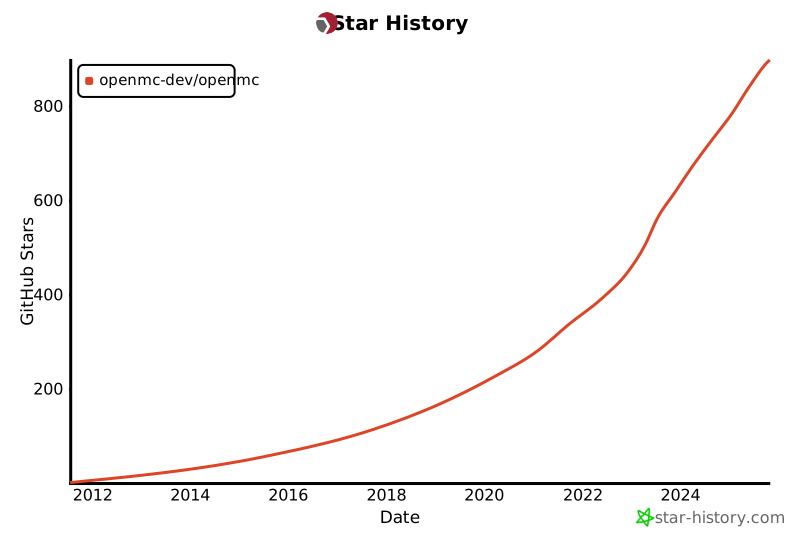
[![bg right:60% 80%](https://api.star-history.com/svg?repos=openmc-dev/openmc&type=Date)](https://star-history.com/#openmc-dev/openmc&Date)