CAD to DAGMC

CAD to DAGMC#

A package that converts CAD geometry to DAGMC h5m files, unstructured mesh files (VTK), and Gmsh (msh) files ready for use in neutronics simulations.

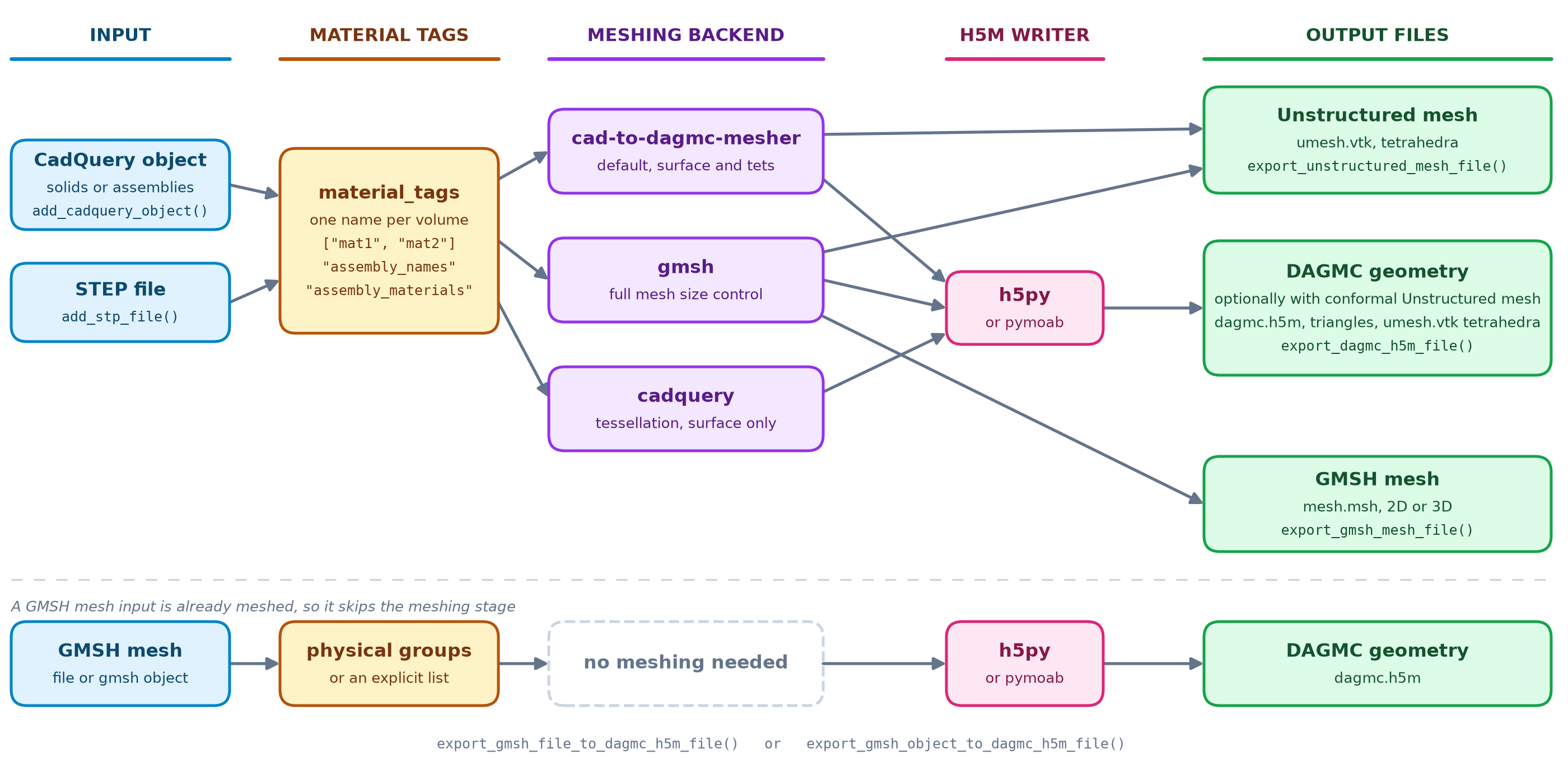
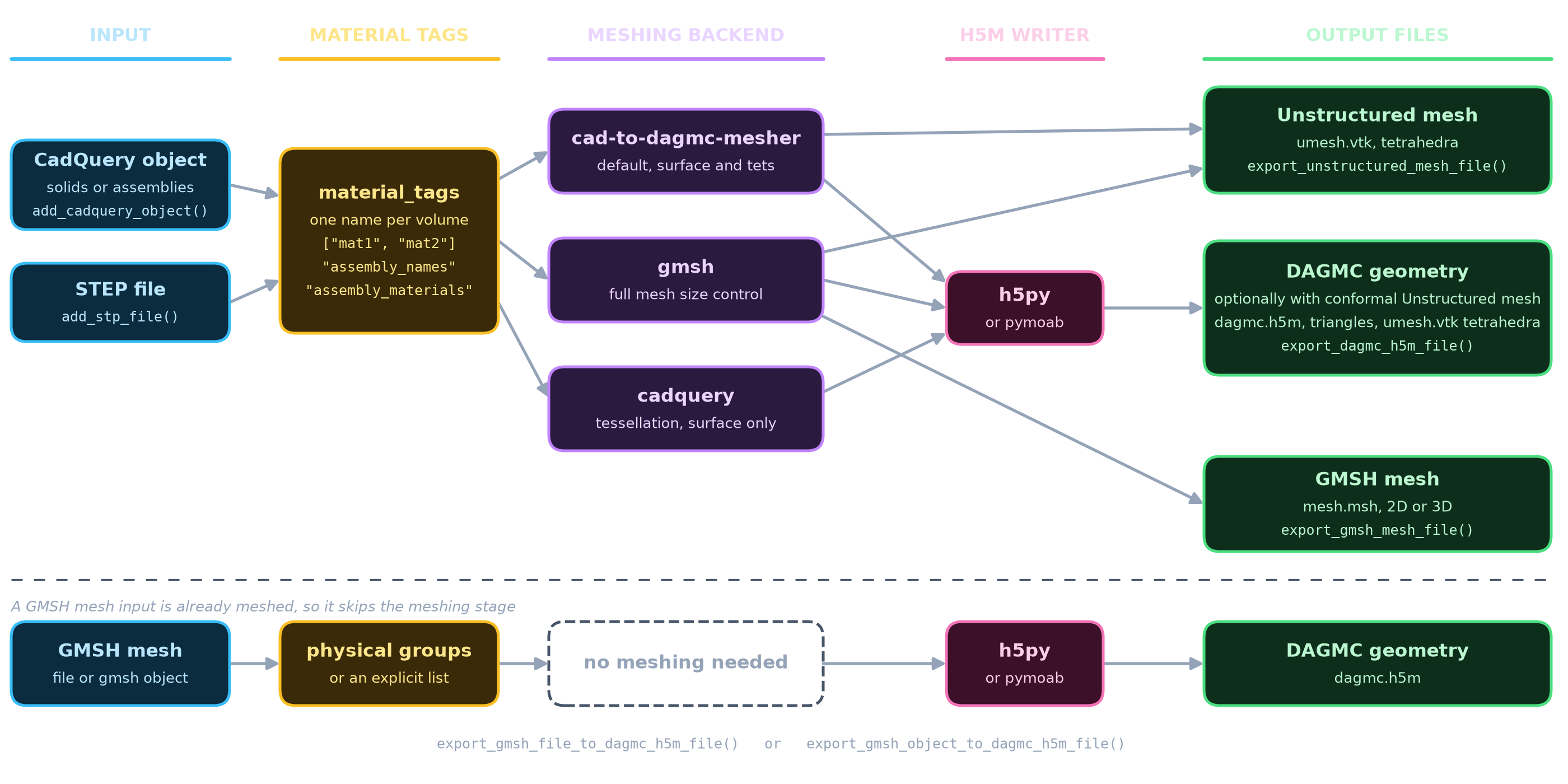
Workflow#

        %%{init: {'theme': 'base', 'themeVariables': { 'fontSize': '13px', 'fontFamily': 'Inter, system-ui, sans-serif'}, 'flowchart': { 'curve': 'monotoneX', 'padding': 30, 'nodeSpacing': 40, 'rankSpacing': 60, 'htmlLabels': true }}}%%
flowchart LR
    subgraph inputs [" "]
        direction TB
        CQ(["  CadQuery  "])
        STEP(["  STEP files  "])
        GMSH_IN(["  GMSH mesh  "])
        CQ ~~~ STEP ~~~ GMSH_IN
    end

    subgraph tagging [" "]
        TAG{"  Material  <br/>  Tagging  "}
    end

    subgraph meshing [" "]
        direction TB
        GMSH_E["  GMSH  "]
        CQ_E["  CadQuery  "]
    end

    subgraph h5m_backend [" "]
        direction TB
        H5PY(("  h5py  "))
        MOAB(("  pymoab  "))
    end

    subgraph outputs [" "]
        direction TB
        H5M[["  DAGMC h5m  "]]
        VTK[["  Unstructured VTK  "]]
        MSH[["  GMSH mesh  "]]
    end

    CQ & STEP & GMSH_IN --> TAG

    TAG --> GMSH_E & CQ_E

    GMSH_E & CQ_E --> H5PY & MOAB
    H5PY & MOAB --> H5M

    GMSH_E --> VTK & MSH

    style inputs fill:none,stroke:none
    style tagging fill:none,stroke:none
    style meshing fill:none,stroke:none
    style outputs fill:none,stroke:none
    style h5m_backend fill:none,stroke:none

    style CQ fill:#e0f2fe,stroke:#0284c7,stroke-width:1.5px,color:#0c4a6e
    style STEP fill:#e0f2fe,stroke:#0284c7,stroke-width:1.5px,color:#0c4a6e
    style GMSH_IN fill:#e0f2fe,stroke:#0284c7,stroke-width:1.5px,color:#0c4a6e

    style TAG fill:#fef3c7,stroke:#d97706,stroke-width:1.5px,color:#78350f

    style GMSH_E fill:#f3e8ff,stroke:#9333ea,stroke-width:1.5px,color:#581c87
    style CQ_E fill:#f3e8ff,stroke:#9333ea,stroke-width:1.5px,color:#581c87

    style H5PY fill:#fce7f3,stroke:#db2777,stroke-width:1.5px,color:#831843
    style MOAB fill:#fce7f3,stroke:#db2777,stroke-width:1.5px,color:#831843

    style H5M fill:#dcfce7,stroke:#16a34a,stroke-width:1.5px,color:#14532d
    style VTK fill:#dcfce7,stroke:#16a34a,stroke-width:1.5px,color:#14532d
    style MSH fill:#dcfce7,stroke:#16a34a,stroke-width:1.5px,color:#14532d
    

Inputs Tagging Meshing H5M Backend Outputs

Key Features#

Multiple Input Formats

Flexible Material Tagging

- CadQuery objects
- STEP files
- GMSH mesh files

- Manual tags
- Assembly names
- CadQuery Materials
- GMSH physical groups

Two Meshing Backends

Multiple Output Formats

- GMSH (full control, volume meshing)
- CadQuery (simpler, direct)

- DAGMC h5m (surface mesh)
- Unstructured VTK (volume mesh)
- GMSH files

Two H5M Backends

Advanced Options

- h5py (default, no MOAB needed)
- pymoab (official MOAB)

- Per-volume mesh sizing
- Geometry scaling
- Parallel meshing